

Introduction
How to use each section of the portal, and how to integrate with the Partner API.
Peplink Portal is where partners run their day-to-day business with Peplink: the devices you have bought and sold, your orders and shipments, deal registrations, SIMs, RMAs and the people on your account. This documentation walks through every section of the portal step by step, with screenshots, and documents every Partner API endpoint for teams that integrate their own systems.
Partner Account & API
Members
Add colleagues to your account, disable access and check certifications.
Resellers
Create and review the reseller accounts under your account.
API Keys
Create an API key and make your first call.
API Reference
Every supported endpoint, with examples.
AI Onboarding
Point your AI coding agent at these docs to build an integration.
Guides & Recipes
Devices
Device management, ownership assignment and sales registration.
Orders
Order history, PO files, NFR coupons and account statement.
Deal Management
Deal registration, POS records and rebate requests.
SIM
eSIMs, physical SIMs and postpaid service.
Support
RMA tracking, device lookup and product check.
Recipes
End-to-end walkthroughs for common API integrations.
New to the portal?
Go to portal.peplink.com and click Continue.

Enter your Peplink ID details and click Next.
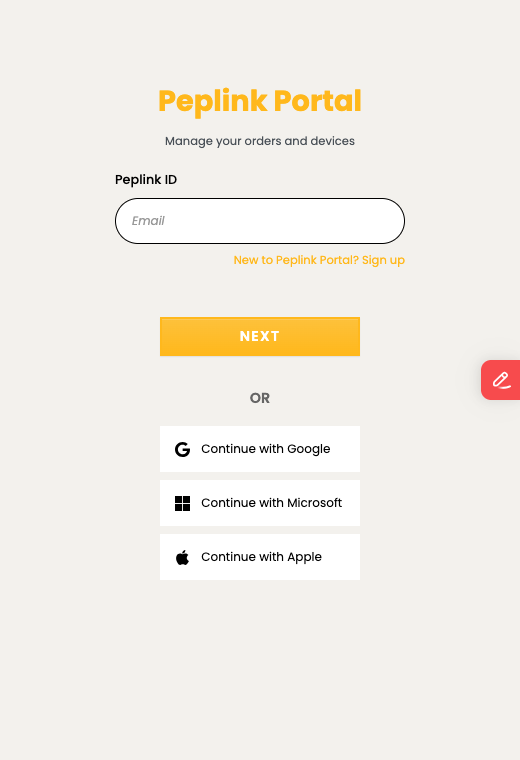
No Peplink ID yet? Click Sign up on that page and create one.
Partners: register with your work email address. You can sign in to the portal only once that address has been added to your company's account, so ask your company's administrator to add you under Members.
Help and updates
- Changelog — what has changed in the portal, the API and these docs
- Peplink Forum — questions and feedback
- Create a support ticket — direct help from our team